%20scale(0.1,-0.1)'%20fill='%23000000'%3e%3cpath%20fill='%230D86ED'%20d='M12620%2014000%20c-8%20-5%20-34%20-10%20-57%20-10%20-23%200%20-45%20-4%20-48%20-10%20-3%20-5%20-17%20-10%20-30%20-10%20-13%200%20-27%20-4%20-30%20-10%20-3%20-5%20-14%20-10%20-25%20-10%20-21%200%20-111%20-46%20-174%20-89%20-100%20-69%20-222%20-211%20-268%20-311%20-48%20-103%20-63%20-162%20-84%20-324%20-10%20-69%2014%20-226%2046%20-311%2046%20-119%20102%20-208%20189%20-298%20148%20-154%20326%20-232%20551%20-244%20328%20-17%20624%20156%20770%20452%2028%2055%2050%20109%2050%20120%200%2012%204%2025%209%2031%2023%2024%2032%20265%2013%20364%20-18%2097%20-23%20113%20-76%20219%20-81%20163%20-213%20291%20-381%20370%20-27%2013%20-58%2027%20-67%2032%20-10%205%20-28%209%20-41%209%20-13%200%20-27%204%20-32%209%20-22%2020%20-290%2039%20-315%2021z'/%3e%3cpath%20d='M11585%2013034%20c-77%20-30%20-194%20-75%20-260%20-100%20-66%20-25%20-125%20-50%20-132%20-56%20-10%20-8%20-13%20-352%20-13%20-1734%200%20-1653%20-1%20-1724%20-18%20-1724%20-10%200%20-22%204%20-28%209%20-5%205%20-103%2054%20-219%20109%20-115%2054%20-343%20162%20-505%20239%20-162%2077%20-320%20152%20-350%20166%20-30%2014%20-122%2057%20-205%2097%20-82%2040%20-186%2089%20-230%20110%20-195%2091%20-247%20116%20-355%20168%20-63%2030%20-180%2085%20-260%20122%20-80%2037%20-178%2084%20-219%20104%20-41%2020%20-77%2034%20-79%2031%20-3%20-3%2015%20-26%2039%20-53%2024%20-26%2064%20-74%2089%20-106%2025%20-32%2061%20-77%2080%20-100%2019%20-23%2091%20-114%20160%20-201%2069%20-87%20242%20-305%20385%20-484%20143%20-180%20325%20-409%20405%20-509%20381%20-481%20438%20-551%20492%20-604%20102%20-99%20240%20-152%20398%20-152%20118%200%20148%208%20433%20128%20122%2052%20328%20138%20457%20191%20129%2054%20305%20127%20390%20163%2085%2035%20231%2095%20324%20134%2093%2038%20192%2081%20220%2095%20115%2058%20197%20141%20256%20259%2062%20126%2060%2060%2060%201520%20l0%201331%20-162%20-1%20c-170%200%20-237%2010%20-358%2055%20-329%20122%20-567%20412%20-612%20744%20-13%20100%20-15%20105%20-30%20104%20-7%200%20-76%20-25%20-153%20-55z'/%3e%3cpath%20d='M8830%2012073%20c-85%20-7%20-159%20-31%20-365%20-115%20-121%20-49%20-229%20-93%20-240%20-98%20-11%20-5%20-171%20-70%20-355%20-144%20-341%20-138%20-682%20-277%20-823%20-336%20-142%20-59%20-243%20-153%20-311%20-288%20-74%20-146%20-68%20-22%20-71%20-1662%20-3%20-1554%20-3%20-1572%2041%20-1666%2078%20-170%20203%20-272%20360%20-295%2041%20-6%20144%20-8%20254%20-5%20102%204%20191%203%20197%20-2%2010%20-6%2013%20-189%2015%20-835%202%20-528%207%20-827%2013%20-828%205%200%2022%2030%2038%2068%2016%2037%2071%20163%20123%20280%2051%20117%20120%20276%20152%20355%2033%2079%20103%20247%20157%20373%20172%20406%20235%20556%20306%20724%20l69%20165%200%201628%20c0%201361%202%201628%2014%201628%2013%200%20358%20-159%20811%20-375%20262%20-125%20326%20-155%20329%20-155%202%200%2062%20-28%20132%20-61%2071%20-34%20165%20-78%20209%20-99%2044%20-21%20141%20-67%20215%20-102%2074%20-36%20176%20-84%20225%20-108%2050%20-23%20176%20-83%20280%20-132%20258%20-123%20278%20-131%20272%20-114%20-5%2011%20-370%20471%20-386%20486%20-4%203%20-22%2025%20-41%2050%20-19%2025%20-40%2052%20-47%2060%20-7%208%20-70%2087%20-140%20176%20-70%2088%20-180%20226%20-243%20305%20-64%2079%20-149%20187%20-190%20239%20-485%20618%20-607%20761%20-690%20811%20-82%2049%20-218%2081%20-310%2072z'/%3e%3c/g%3e%3c/svg%3e)
Kitchen and inventory
The kitchen is more than an order screen.
From the order arriving, to preparation and production, then into ingredients, recipes, stock and cost — one connected cycle.
From recipe to cost
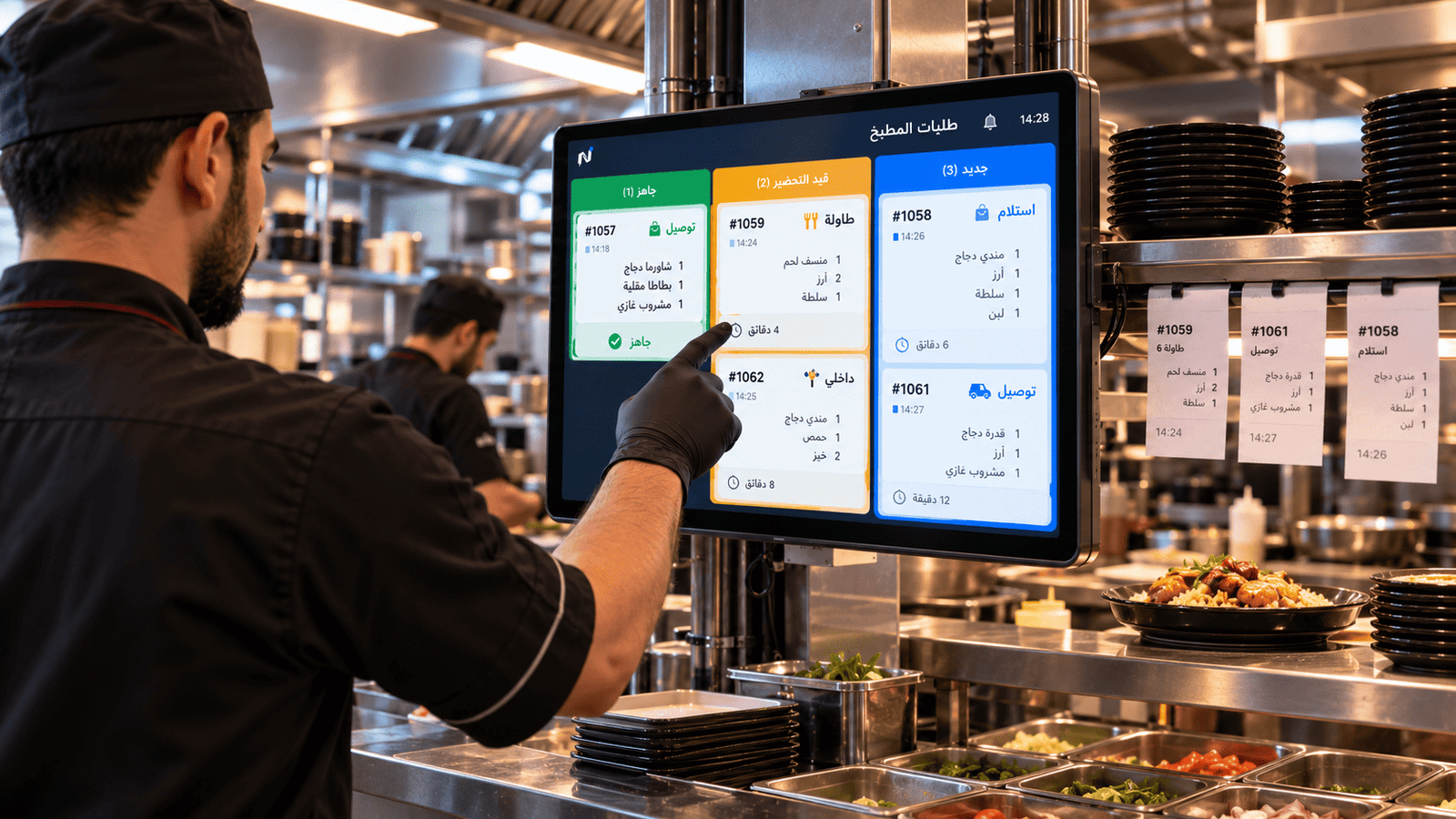
Kitchen flow
What needs preparing right now?
Orders reach the kitchen in a clear working order, and their status updates as preparation moves.
-
Kitchen order flow
Orders arrive at the kitchen in a clear working order.
-
Preparation status
What is in progress and what is done during busy service.
-
Kitchen printing
Prep tickets print at the kitchen stations you set up.
-
Daily operations
The kitchen sits inside the same order and stock cycle, not apart from it.
What we describe here is kitchen order flow, preparation status and printing. We do not present this as an advanced KDS with a ticket rail.
Ingredients, recipes & production
A dish isn't just a menu price. It is precise ingredients and food cost.
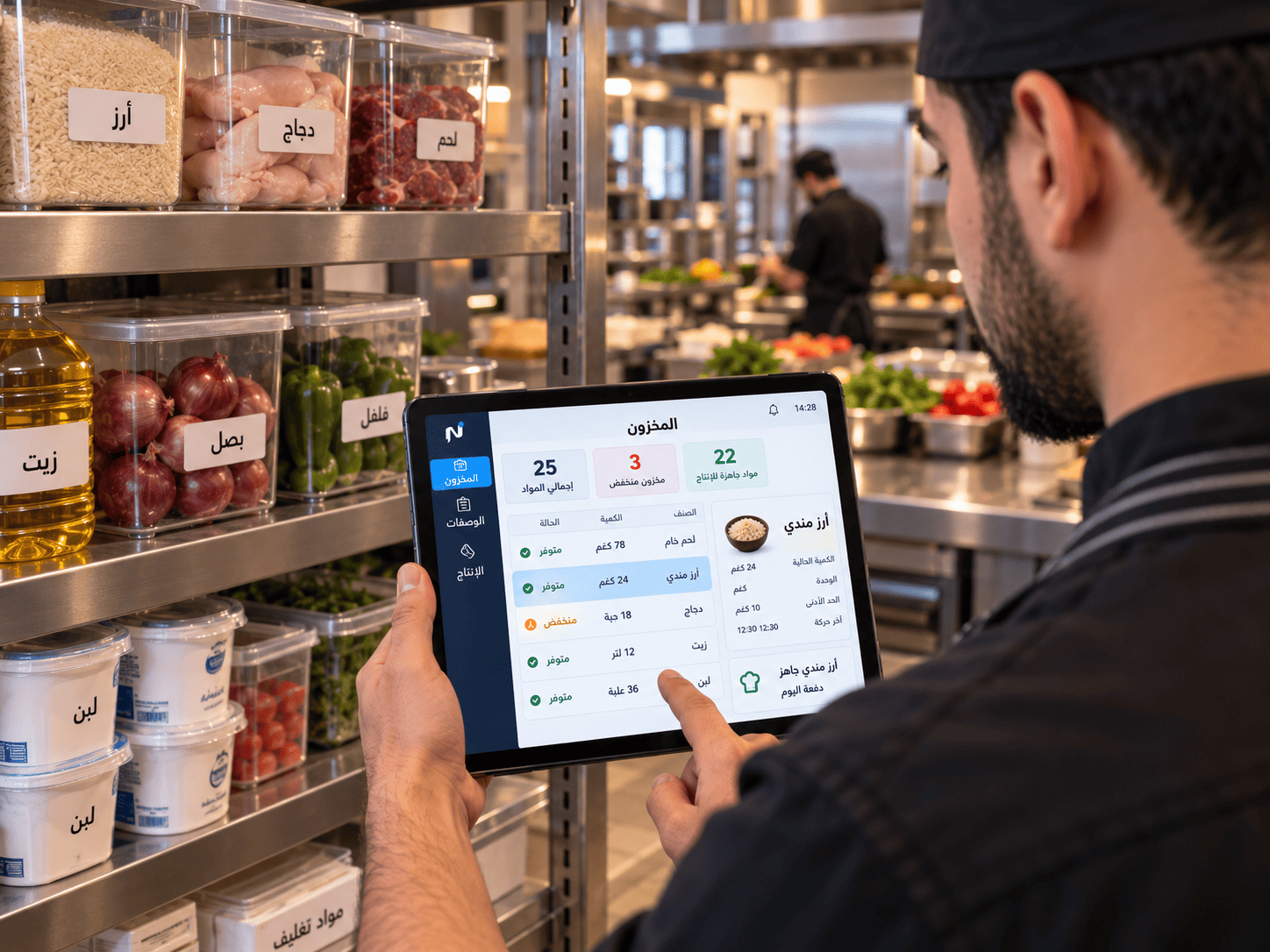
Link every menu item directly to its raw material units. As orders are fulfilled, portions are deducted automatically from inventory, while prepped materials and batch production are recorded to prevent shortages and control waste.
- Structured recipes and exact raw ingredient consumption
- Production batch logging for pre-prepped kitchen components
- Automatic stock deductions tied to every finalized order
- Direct waste tracking and immediate financial loss calculation
 From recipe to inventory
Stock movement
Know what came in, what was used, and what is left.
-
Purchasing
Materials arrive through purchasing and their weighted cost is calculated.
-
Transfer to the kitchen
Movement from store to kitchen and operating points.
-
Preparation and production
Materials become prepared items and finished dishes.
-
Sale
The recipe deducts what was consumed with every order.
-
Stock count
Count stock and compare it with what is recorded.
-
Waste
What is wasted is recorded at its cost, not lost as a number.
Awareness and cost
Stock isn't a number. Stock is cost.
-
Expiry awareness
Keep track of materials tied to expiry dates.
-
Purchasing and weighted cost
Ingredient cost updates with every purchase.
-
Waste and its cost
Waste appears inside the day's cost.
-
Connected to profitability
Ingredient cost reaches COGS and per-item margin.
Next step
Show us your dishes, and we'll show you the whole cycle.
Book a demo, and we'll follow one recipe from purchase to margin.
Already a subscriber? Sign in to your restaurant dashboard