%20scale(0.1,-0.1)'%20fill='%23000000'%3e%3cpath%20fill='%230D86ED'%20d='M12620%2014000%20c-8%20-5%20-34%20-10%20-57%20-10%20-23%200%20-45%20-4%20-48%20-10%20-3%20-5%20-17%20-10%20-30%20-10%20-13%200%20-27%20-4%20-30%20-10%20-3%20-5%20-14%20-10%20-25%20-10%20-21%200%20-111%20-46%20-174%20-89%20-100%20-69%20-222%20-211%20-268%20-311%20-48%20-103%20-63%20-162%20-84%20-324%20-10%20-69%2014%20-226%2046%20-311%2046%20-119%20102%20-208%20189%20-298%20148%20-154%20326%20-232%20551%20-244%20328%20-17%20624%20156%20770%20452%2028%2055%2050%20109%2050%20120%200%2012%204%2025%209%2031%2023%2024%2032%20265%2013%20364%20-18%2097%20-23%20113%20-76%20219%20-81%20163%20-213%20291%20-381%20370%20-27%2013%20-58%2027%20-67%2032%20-10%205%20-28%209%20-41%209%20-13%200%20-27%204%20-32%209%20-22%2020%20-290%2039%20-315%2021z'/%3e%3cpath%20d='M11585%2013034%20c-77%20-30%20-194%20-75%20-260%20-100%20-66%20-25%20-125%20-50%20-132%20-56%20-10%20-8%20-13%20-352%20-13%20-1734%200%20-1653%20-1%20-1724%20-18%20-1724%20-10%200%20-22%204%20-28%209%20-5%205%20-103%2054%20-219%20109%20-115%2054%20-343%20162%20-505%20239%20-162%2077%20-320%20152%20-350%20166%20-30%2014%20-122%2057%20-205%2097%20-82%2040%20-186%2089%20-230%20110%20-195%2091%20-247%20116%20-355%20168%20-63%2030%20-180%2085%20-260%20122%20-80%2037%20-178%2084%20-219%20104%20-41%2020%20-77%2034%20-79%2031%20-3%20-3%2015%20-26%2039%20-53%2024%20-26%2064%20-74%2089%20-106%2025%20-32%2061%20-77%2080%20-100%2019%20-23%2091%20-114%20160%20-201%2069%20-87%20242%20-305%20385%20-484%20143%20-180%20325%20-409%20405%20-509%20381%20-481%20438%20-551%20492%20-604%20102%20-99%20240%20-152%20398%20-152%20118%200%20148%208%20433%20128%20122%2052%20328%20138%20457%20191%20129%2054%20305%20127%20390%20163%2085%2035%20231%2095%20324%20134%2093%2038%20192%2081%20220%2095%20115%2058%20197%20141%20256%20259%2062%20126%2060%2060%2060%201520%20l0%201331%20-162%20-1%20c-170%200%20-237%2010%20-358%2055%20-329%20122%20-567%20412%20-612%20744%20-13%20100%20-15%20105%20-30%20104%20-7%200%20-76%20-25%20-153%20-55z'/%3e%3cpath%20d='M8830%2012073%20c-85%20-7%20-159%20-31%20-365%20-115%20-121%20-49%20-229%20-93%20-240%20-98%20-11%20-5%20-171%20-70%20-355%20-144%20-341%20-138%20-682%20-277%20-823%20-336%20-142%20-59%20-243%20-153%20-311%20-288%20-74%20-146%20-68%20-22%20-71%20-1662%20-3%20-1554%20-3%20-1572%2041%20-1666%2078%20-170%20203%20-272%20360%20-295%2041%20-6%20144%20-8%20254%20-5%20102%204%20191%203%20197%20-2%2010%20-6%2013%20-189%2015%20-835%202%20-528%207%20-827%2013%20-828%205%200%2022%2030%2038%2068%2016%2037%2071%20163%20123%20280%2051%20117%20120%20276%20152%20355%2033%2079%20103%20247%20157%20373%20172%20406%20235%20556%20306%20724%20l69%20165%200%201628%20c0%201361%202%201628%2014%201628%2013%200%20358%20-159%20811%20-375%20262%20-125%20326%20-155%20329%20-155%202%200%2062%20-28%20132%20-61%2071%20-34%20165%20-78%20209%20-99%2044%20-21%20141%20-67%20215%20-102%2074%20-36%20176%20-84%20225%20-108%2050%20-23%20176%20-83%20280%20-132%20258%20-123%20278%20-131%20272%20-114%20-5%2011%20-370%20471%20-386%20486%20-4%203%20-22%2025%20-41%2050%20-19%2025%20-40%2052%20-47%2060%20-7%208%20-70%2087%20-140%20176%20-70%2088%20-180%20226%20-243%20305%20-64%2079%20-149%20187%20-190%20239%20-485%20618%20-607%20761%20-690%20811%20-82%2049%20-218%2081%20-310%2072z'/%3e%3c/g%3e%3c/svg%3e)
The Notify system
One system connecting the customer experience to restaurant operations.
From the first digital interaction with your customer, to the order, to what happens inside the restaurant, through to cost and profit.
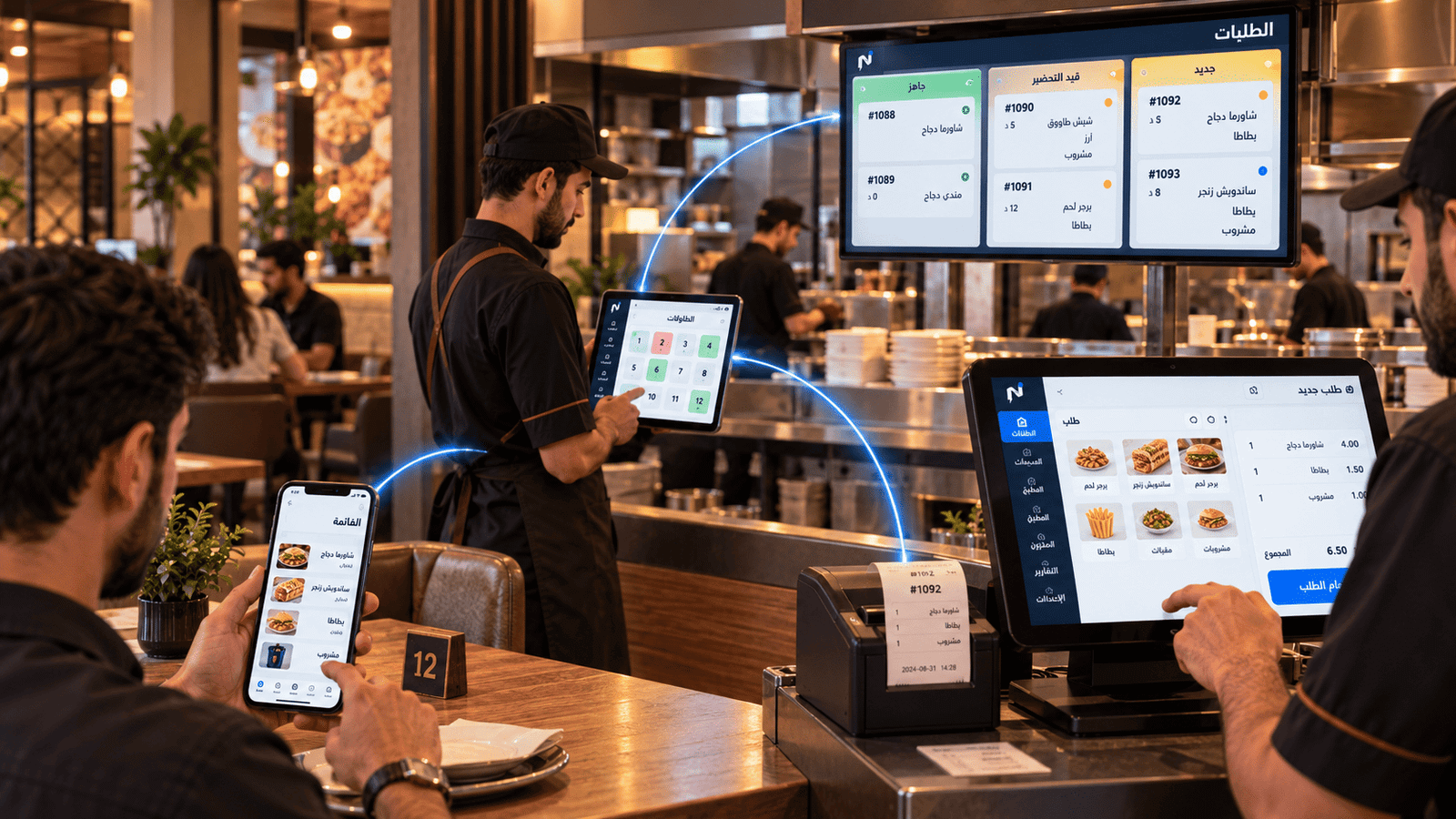
One path from order to cost
The system
Four stages that describe your restaurant's day.
Reach, Order, Operate, Control — each stage hands over to the next instead of starting from scratch.
- 01
Reach
A digital identity, a link and a QR code that lead customers to your menu.
- 02
Order
Phone, table, counter or delivery — through the same path.
- 03
Operate
POS, kitchen, tables, staff and inventory.
- 04
Control
Cost, expenses, waste, commissions and margins.
Reach
It all starts before the customer walks in.
Notify Smart Link is the customer-facing digital gateway. Notify Restaurant is the operational layer behind it.
-
Notify Smart Link
One link that carries your digital identity and leads customers to the menu.
-
Auto SMS messaging
Text messaging for staying in touch with your customers.
-
QR code
A code that opens the menu from the table or anywhere a customer sees you.
-
Digital identity
An organised presence instead of scattered links and details.
Order
Ordering paths multiply. The operational path stays one.
It doesn't matter where the order started — it ends where your team already works.
Every point of contact can become a place to order.
The digital menu doesn't just display — it takes the order, and the customer can follow its status.
- Digital menu in Arabic and English
- Table QR ordering
- Order ahead for pickup
- Counter ordering
- Delivery orders
- Customer order status tracking
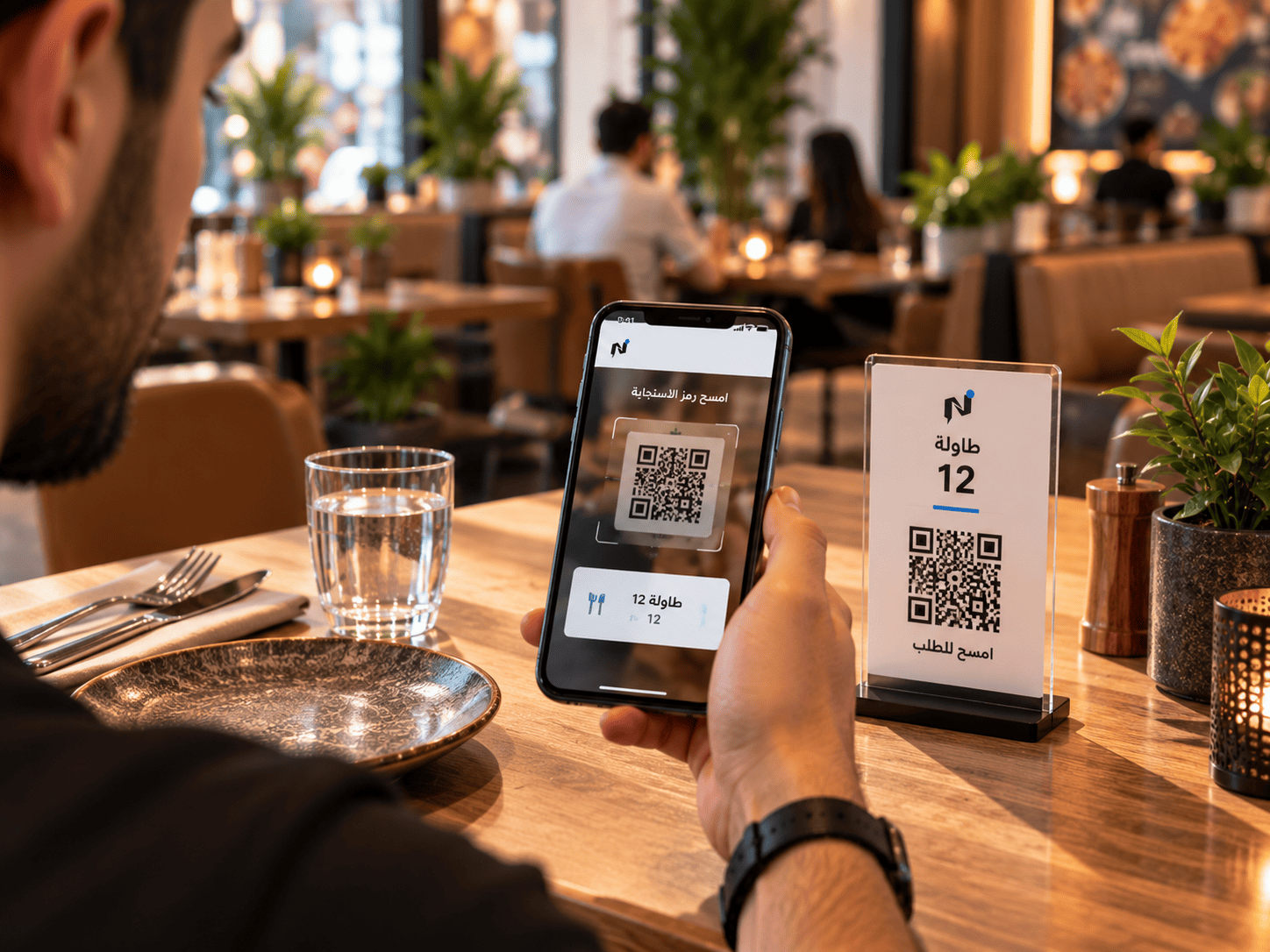 Customer view
Operate
The point of sale is the start of operations, not the end.
Orders, customers, tables, staff, shifts and expenses in one system.
-
Touch POS
Dine-in, pickup, delivery and delivery-app orders.
-
Tables and floor plan
Table layout and status in front of your floor team.
-
Staff and roles
Permissions that match each person's role in the restaurant.
-
Shifts
When a shift opened, when it closed, and what happened in it.
-
Daily expenses
The day's expenses inside the full operating picture.
A prepared Windows terminal can keep taking orders and printing through an internet interruption, then synchronise once the connection returns.
Kitchen
The kitchen executes the order… and connects to inventory and cost immediately.
From ticket arrival at prep screens and printers, through batch production and pre-prepped items, to instant cost reflection.
-
Kitchen order flow
Orders reach the kitchen in a clear working order.
-
Preparation status
What is in progress and what is done, even under pressure.
-
Production and prepared items
What you prepare in advance is recorded and reflected in stock.
-
Kitchen printing
Prep tickets print at the kitchen stations.
-
Recipes and cost
The recipe ties a dish to its ingredients and its cost.
Inventory and cost
Know what came in, what was used, and what is left.
Ingredients, recipes, purchasing, stock counts and waste sit in the same operating cycle.
-
Purchasing and weighted cost
Ingredient cost is recalculated with every purchase.
-
Stock and transfers
Movement between store, kitchen and operating points.
-
Expiry awareness
Keep track of items tied to expiry dates.
-
Stock counts
Count stock and compare it against what is recorded.
-
Waste and its cost
Waste shows up as real cost, not a missing number.
Financial & operational control
Connect today's revenue with real costs… before closing the till.
Track taxes, invoices, operating expenses, and consumed food costs so your daily financial picture is complete.
-
Tax and invoices
Configure tax and the shape of invoices and receipts.
-
Cost of goods sold
Connect what you sold to what it actually cost you.
-
Delivery-app commissions
Commission counted inside the order's cost, not outside it.
-
Margins and profitability
A clearer view of per-item margin and operating profitability.
Custom solutions
Your restaurant has its own way. The setup adapts to it.
If your ordering, preparation or pickup path is different, we study how your restaurant runs and build the right setup — whether that is a tailored self-order station or a custom pickup path.
Hardware and setup
We supply, configure, install and support.
We provide suitable standard hardware for the way your restaurant works, then prepare, install and support it: POS station, receipt printer, kitchen printer, cash drawer and customer display.
FAQ
Questions restaurant owners ask before starting.
What is Notify Restaurant?
A restaurant growth and operations system. It connects the digital menu and ordering with POS, kitchen, inventory, delivery operations, cost and reporting, so these stages run in one path instead of separate systems.
Is Notify Restaurant just a cashier system?
No. The point of sale is one layer inside the system. Alongside it run digital ordering, the kitchen, ingredients and recipes, inventory, purchasing, delivery, cost and reporting — all in the same operating cycle.
Can customers order from the table?
Yes. Each table can carry its own QR code, so the customer opens the menu on their phone and sends an order already linked to their table number.
Can customers order before they arrive?
Yes, for order-ahead and pickup. The customer sends the order in advance, collects it on arrival, and can follow its status. This does not include booking specific scheduled pickup time slots.
Does the restaurant need special hardware?
Notify can supply, configure, install and support suitable standard hardware. Equipment you already own can also be reviewed to see whether it fits.
Can the way we operate be customised?
Yes. If your ordering, preparation or pickup path is different, we study how you work and build the setup that fits it.
Next step
See the system running on your restaurant.
Book a demo, and we start from how you operate today rather than from a canned presentation.
Already a subscriber? Sign in to your restaurant dashboard